
Modern operating concepts for greater efficiency at the operator workstation
In mission-critical control rooms and other demanding operational environments, workplace requirements are changing noticeably. As systems become increasingly interconnected and operational environments grow more complex, the focus is gradually expanding beyond infrastructure alone. While powerful technologies such as KVM and AV-over-IP continue to provide the foundation, workplace interaction is becoming increasingly important. This raises a central question for control room planners: How can operator workstations be designed so that highly complex environments can be managed more easily, quickly, and safely?
For us, this development is a logical next step. Building on many years of experience with high-performance control room and infrastructure technologies, we are strategically expanding our portfolio to include solutions that improve user interaction at the workstation.
When complexity becomes a usability factor
Today, operators must manage more systems, more information sources, and more processes simultaneously than ever before. At a single workstation, a wide range of systems are often used in parallel:
- operational IT and dispatch systems
- monitoring, sensor, and video surveillance sources
- communication and collaboration platforms
- process and control applications
- visualization systems such as operator displays and video walls
Even routine tasks often involve several manual steps. Users need to switch between systems, select sources, adjust displays, or deliberately trigger predefined workflows. In day-to-day operations, this large number of individual interactions quickly adds up to a significant burden and efficiency factor.
As a result, usability becomes a critical operational factor. The goal is to improve ease of use and workflow speed without compromising security and reliability.
Four building blocks for more efficient interaction in the control room
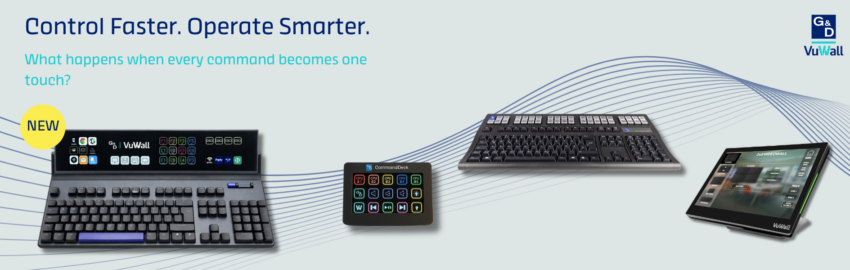
How this requirement can be put into practice is demonstrated by four solution approaches that address the interface between the technical system environment and actual user interaction: CommandKeyboard, CommandDeck, ControlVu by VuWall, and CommandKeyboard Advanced.
1. CommandKeyboard
The CommandKeyboard combines the familiar feel of a conventional keyboard with additional, freely programmable function keys. This enhances the workstation with directly accessible, individually configurable input functions without fundamentally changing established operating routines.
As a standard HID keyboard, the CommandKeyboard can be seamlessly integrated into existing working environments. The programmable keys are configured via software, while the macros are stored directly in the device’s internal memory. This allows the device to operate without additional runtime software or special drivers on the target system.
Its particular added value lies in the combination of simple integration, high compatibility, and immediate access to recurring functions. Frequently used input sequences can be assigned directly to keys and triggered instantly. The result is an operating concept that remains familiar while also being specifically adaptable to the requirements of modern control room, monitoring, and operator workstations.
2. CommandDeck
While the CommandKeyboard extends familiar input methods, the CommandDeck goes a step further by making recurring workflows more directly accessible. As a dedicated, programmable control interface, it brings frequently used functions exactly where they are needed: directly to the operator’s workstation.
Instead of manually performing routine actions through multiple software layers each time, predefined commands can be triggered directly via a clearly structured control surface. This reduces intermediate steps, accelerates recurring processes, and supports the consistent execution of typical tasks.
Technically, the CommandDeck operates on the basis of standardized HID signals and transmits defined input or control impulses to the connected system. This enables flexible integration into existing environments and allows it to serve as a direct command layer at the workstation.
3. ControlVu by VuWall
Visualization also plays a key role in modern operator workstations. ControlVu provides a central software interface for this purpose, enabling users to manage layouts, route sources, and adjust different display scenarios directly from the workstation.
With the TRx control software, ControlVu can be flexibly integrated into a wide range of workstation, KVM, and system environments. This makes it possible to map not only display and visualization tasks, but also workstation-related control functions through a single central interface.
The result is greater operational flexibility, faster adjustments, and more consistent control across different application areas.
4. CommandKeyboard-Advanced
Many of these development steps come together in the CommandKeyboard-Advanced as a central operating and control unit. The device is designed as a central operating and control unit for modern control room workstations. With tactile inputs, an integrated touch display, full-surface illumination, and its own processing power, it combines key operating functions in a single device.
Its technical foundation is an integrated system-on-chip (SoC), which allows web-based applications and control interfaces to be provided directly on the device — including web interfaces or environments such as VuWall Dynamic Control. This opens up scope for custom HTML5 dashboards, control room interfaces, and other browser-based applications on the touch display.
The HID-based execution of predefined inputs is also implemented on this platform.
As a result, the CommandKeyboard-Advanced brings more functionality, more flexibility, and more intelligence directly to the workstation. Its open architecture enables it to be combined with different applications, web interfaces, and control solutions. At the same time, defined inputs can be triggered directly via the device, without the keyboard itself requiring a network connection — a clear advantage, especially in highly secure environments.
This creates greater operational flexibility, enables rapid adjustments, and supports consistent operation across different application areas.
Integration into existing infrastructure
Modern user interfaces should not be viewed as isolated tools. What matters is that they integrate openly into existing technology ecosystems and are able to interact with different systems, platforms, and applications. The solutions presented here are not tied to any specific control room infrastructure; they can also be deployed independently and integrated into existing working environments.
This is precisely what makes them particularly relevant: they make it possible to expand the functionality of operator workstations in a targeted way — regardless of the infrastructure being used in the background.
Conclusion
As system landscapes in control rooms grow more complex, the user interface itself is becoming a decisive factor for efficiency, ergonomics, and situational awareness. Well-designed operating concepts help structure processes more clearly, shorten operating paths, and tailor the workstation more precisely to the requirements of the respective operational environment.
Building on powerful control room and infrastructure technologies, G&D is now placing greater focus on solutions for the operator workstation with the CommandKeyboard, the CommandDeck, and the CommandKeyboard-Advanced. Complemented by software-based interfaces such as VuWall’s ControlVu, it becomes clear how infrastructure and operating concepts can be meaningfully combined.
>> Other articles you might be interested in:
bluedec™ – Our Video Compression for Control Rooms, Now Even More Powerful
Trusted. Improved. VisionXS 2.0

- G&D and VuWall Unveil vsNEO, a Zero-Config KVM Platform Built for Simpler Control Room Deployment - 11. September 2026
- More Data, Better Decisions? How To Avoid Information Overload in Control Rooms - 11. August 2026
- Vutec (Pty) Ltd Appointed as the Exclusive Distributor for G&D and VuWall Solutions in South Africa - 19. June 2026